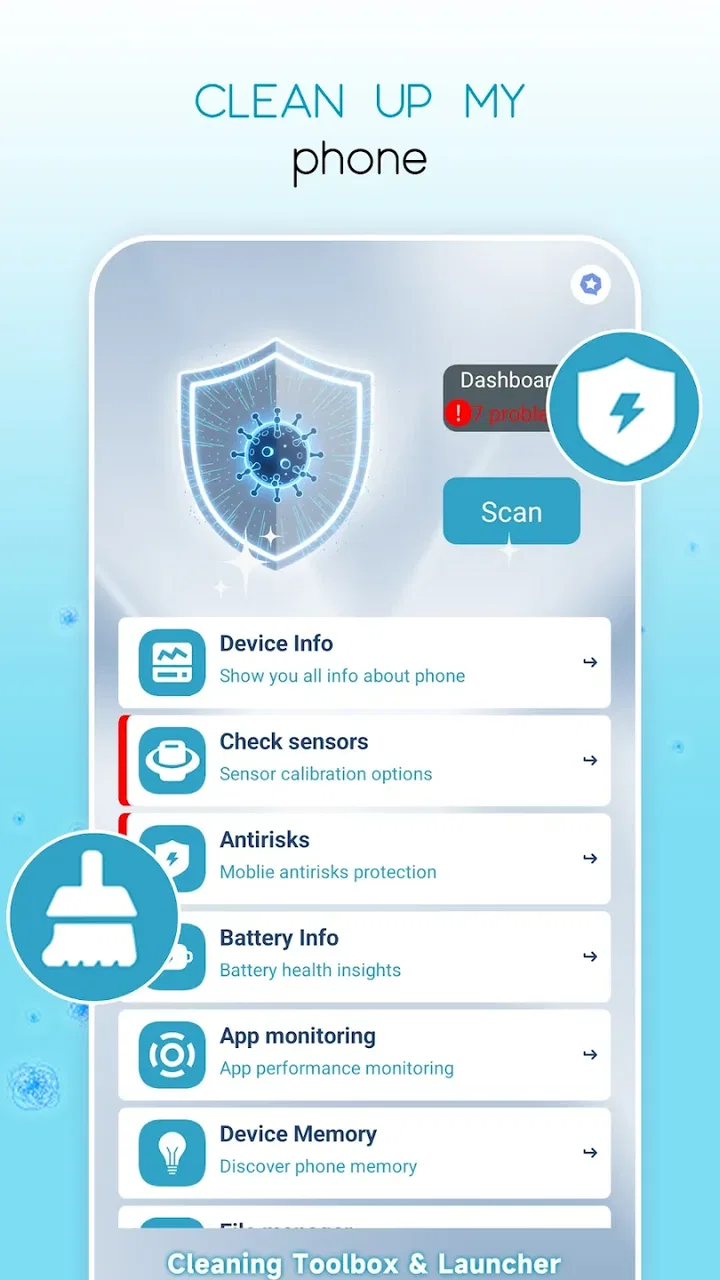
Cleaning Toolbox & Launcher
- 4.2
- Rating
- 100.00K
- Installs
- Free
- Price

 Analysis by App-foxy
When an Android phone starts feeling crowded, the problem is rarely just one large file. It is usually a mix of forgotten downloads, unused apps, scattered shortcuts, and the small amount of friction that makes ordinary maintenance easy to postpone. Cleaning Toolbox & Launcher is aimed at that everyday situation. I approached it as a practical cleaner and launcher, not as a magic speed-up button, and that distinction matters when deciding whether it deserves a place on your phone.
Developed by YINHEE LIMITED, this free Tools app combines two jobs that are normally handled separately: tidying the device and giving you a more organized way to reach what you use. Its audience is broad, with an Everyone age rating, and the current release is version 1.0 for devices running Android 10 or newer. I see its main appeal in convenience: instead of treating storage cleanup and home-screen organization as unrelated chores, it puts both ideas under one roof.
The app has attracted over one hundred thousand installs and holds a 4.2 average from more than one hundred ratings, with over twenty written reviews. Those figures suggest a useful level of early interest, but they are not a substitute for deciding whether its particular combination suits your habits. My recommendation depends less on the headline promise and more on whether you want a simple maintenance tool or a deeply configurable replacement for Android’s built-in experience.
You May Also Like

 Pandora - Music & Podcasts
Pandora’s Music Is Easy to Start, but Harder to Recover
Pandora’s strength is its low-effort path from a seed to a station. Its weak spot is how much confidence it asks you to place in connection, setup, and quiet recovery.

 8 Ball Pool
 Is Built on Rivalries, Rematches, and Routine
A close look at the rivalries, rematches, shared routines, and unanswered safety questions that turn a quick pool match into a persistent mobile community.

 Samsung Music
’s Quiet Strength Is Playing What You Already Own
Its reach comes less from spectacle than from dependable access to a personal library. That simplicity is both the app’s strongest retention engine and its ceiling.

 AccuWeather: Weather Radar
AccuWeather Review: A Quick, Clear Forecast for Everyday Decisions
For everyday plans, the best forecast is the one you can understand quickly. AccuWeather makes rain timing, radar, and local conditions easy to act on, with a few trade-offs.

 Hill Climb Racing
Why Hill Climb Racing Still Turns Crashes Into One More Run
A tiny car, a bumpy hill and one more upgrade: Hill Climb Racing keeps resurfacing because its simple chaos makes every near-miss feel personal.

 AliExpress - Shopping App
AliExpress Makes Global Shopping Feel Personal, but Shoppers Bear the Risk
AliExpress turns a global marketplace into a pocket-sized discovery engine. Its reach is useful, its shopping loop compelling, and its trade-offs easy to miss.
More From Our News Desk
View All News


How I Would Decide Whether Cleaning Toolbox & Launcher Fits
I’d judge its fit by whether it can become part of a small, repeatable phone-care routine rather than an app I open once out of curiosity. I’d start with the task that currently causes the most friction, then see whether the other half of the app adds enough convenience to keep around. That makes the next question less about first impressions and more about what sustained use is likely to feel like.
Start with the problem, not the promise
I would first ask what is actually bothering you. If the issue is that your phone is nearly full, a cleaner can be useful only when it helps you identify items you are comfortable removing. If the issue is that your apps are hard to find, a launcher may be the more valuable half of the package. If you want both, the combined approach becomes more interesting than downloading two unrelated utilities.
That distinction prevents a common mistake: installing a cleaner while expecting it to transform an older phone into a new one. Removing clutter can recover space and reduce visual noise, but it cannot repair a worn battery, improve a weak network connection, or make demanding apps fundamentally lighter. I would use this app for housekeeping and access, not as a cure-all for every performance complaint.
What I would check before making it the default
The first practical question is whether your phone runs Android 10 or later. That minimum requirement excludes older devices, so anyone keeping an aging handset should check the system version before planning a switch. On a compatible device, I would also look at how much I rely on the phone maker’s home screen, widgets, gestures, and app organization. A launcher is not just another icon; it can change the small routines you perform dozens of times a day.
I would also consider how cautious I am about deletion suggestions. A responsible cleanup habit means reviewing what is selected rather than approving every recommendation automatically. Photos, downloaded documents, offline media, and application data can have personal value even when they look like clutter. The app can make the review process more convenient, but the final decision should remain mine.
The everyday test I used as my mental benchmark
Imagine coming home after a trip with a phone full of screenshots, temporary downloads, duplicate-looking images, and several apps installed for a single occasion. At the same time, the home screen has become a patchwork of icons, with the tools I use every morning buried among rarely opened apps. In that scenario, I would want one short session to identify removable clutter and then arrange the apps I actually need for the next week.
That is the strongest case for this product. The cleaning side addresses the backlog, while the launcher side helps prevent the same disorder from returning. The benefit is not simply saving a few taps; it is creating a repeatable routine. I would clean after a large download session, then place the apps needed for travel, work, or study where they are easy to reach. This workflow makes the combined design feel purposeful rather than like two unrelated tools sharing a name.
Where the combined approach wins
Its clearest advantage is focus. Many Android users do not want to compare a separate storage utility, a separate home-screen replacement, and a separate file manager. They want a straightforward place to begin. Cleaning Toolbox & Launcher speaks to that user: someone who wants a cleaner starting point and a less chaotic route to everyday apps without turning phone maintenance into a technical project.
I also like the possibility of separating cleanup from deletion. A good session can begin with inspection, continue with selective removal, and finish by simplifying access to what remains. That sequence is more useful than treating storage as a one-time emergency. When the home screen reflects current priorities, it becomes easier to notice which apps are no longer part of daily life, which can make future cleanup decisions more deliberate.
The real strength is the workflow between cleaning and access, not the idea that a single tap can solve every phone problem. I would recommend judging it by how much routine friction it removes. If it helps you find important apps faster and approach clutter with more confidence, its value is practical even when the storage gain is modest.
Who is likely to appreciate it most
I think it is best suited to people who want a lighter-touch tool. New Android users may appreciate having a clear place to start, especially if the standard home screen feels busy. Families sharing advice about phone maintenance may also find the combined concept easier to explain than a collection of specialized utilities. Likewise, anyone who regularly forgets where downloads or rarely used apps have gone may benefit from a more intentional cleanup habit.
It can also suit users who change contexts often. A student moving between classes, a traveler preparing for a trip, or a freelancer switching between client apps may prefer a home screen organized around current tasks. The launcher can become a practical front door, while the cleaning tools help remove the temporary material that accumulates around those tasks.
Where a different category may fit better
I would look elsewhere if my main need were detailed file management. A dedicated file manager is usually the better category for browsing folders, moving documents between locations, renaming files carefully, or handling external storage. The combined design here is more approachable, but approachability can come at the expense of fine control.
I would also compare it with the phone’s built-in storage settings before installing anything. Android already provides system-level information and removal controls on many devices. If those tools already show me what is consuming space and I am comfortable managing the home screen myself, adding another app may not bring enough benefit. The advantage here is convenience and consolidation, not guaranteed superiority over native controls.
For people who want extensive visual customization, a dedicated launcher may be a better choice. Specialist launchers tend to attract users who care about detailed layouts, gesture behavior, icon presentation, or highly personal home-screen systems. I would not choose this app solely because it includes the word launcher; I would choose it because I value a simpler combination of organization and cleanup.
There is another important trade-off for privacy-sensitive users. Any cleanup tool deserves careful attention because storage can contain personal material. I would review every screen, avoid treating all suggested items as disposable, and keep irreplaceable photos or documents backed up elsewhere. Someone who prefers to keep maintenance entirely inside Android’s own settings may feel more comfortable without an additional utility.
What the free price means in practice
The app is free to install, which makes trying the combined workflow relatively easy. However, optional in-app purchases range from $2.99 to $17.99 per item. I would treat that as a reason to evaluate the free experience first rather than assuming every useful part is included without cost. Before paying, I would ask whether the paid option solves a problem I actually have, not merely whether it sounds more complete.
This is also where the cost of switching matters. Installing a new launcher can change muscle memory. I may need time to rebuild the arrangement of icons, decide which shortcuts belong on the first screen, and adjust to a different starting point. If I later return to the original launcher, I may spend another session restoring the layout I prefer. That is not a financial cost, but it is real user effort, and it should be part of the decision.
My safest approach would be gradual. I would first use the cleaning functions without immediately reorganizing everything, note whether the suggestions are understandable, and then test the launcher with a modest layout. I would keep the existing arrangement in mind before making major changes. This reduces the risk of turning a simple cleanup into an annoying recovery project.
Three practical habits that make the app more useful
First, I would run cleanup after a specific event rather than whenever the phone feels vaguely slow. After downloading travel documents, recording a batch of videos, or installing temporary work apps, the source of the clutter is easier to remember. That context makes it safer to review items because I know which files are still needed.
Second, I would use the launcher as a decision filter. Instead of placing every favorite app in the most visible area, I would reserve the first screen for actions I perform repeatedly and keep occasional tools less prominent. This turns the home screen into a map of current priorities. It also exposes apps that no longer deserve attention, which can guide a later cleanup session.
Third, I would separate “can remove” from “should remove.” A file may be technically disposable but still useful as a reference, receipt, memory, or offline copy. I would inspect names and context before confirming deletion, particularly when the phone has recently been used for work or travel. This small pause is more important than any promise of instant tidiness.
A fourth habit is to avoid measuring success only by recovered space. Sometimes the best result is finding an important app quickly or removing enough visual clutter to make the phone feel calmer. On a device with plenty of free storage, the launcher may provide more day-to-day value than the cleaner. On a nearly full device, the reverse may be true. The two parts should be judged separately as well as together.
Limitations I would keep in mind
Because this is version 1.0, I would approach it with reasonable expectations about maturity. A first release can be perfectly usable while still leaving room for smoother flows, clearer explanations, or broader customization in later updates. I would pay attention to whether the app explains why an item is being suggested for removal and whether the launcher feels natural after several days, not just during the first five minutes.
The combined format can also feel less specialized than category leaders. A dedicated cleaner may offer a more focused maintenance experience, while a dedicated launcher may provide more control over appearance and behavior. Cleaning Toolbox & Launcher asks you to accept a middle ground: one convenient package instead of the deepest toolkit in either category. For many people that is a sensible exchange; for enthusiasts it may feel limiting.
Another limitation is that organization takes ongoing effort. No launcher can decide perfectly which apps belong in your daily view, and no cleaner can understand the personal meaning of every file. The app can support a routine, but it cannot replace judgment. If I install it expecting automatic, consequence-free maintenance, I am likely to be disappointed.
My recommendation after weighing the alternatives
I would recommend Cleaning Toolbox & Launcher to an Android user who wants a simple starting point for two connected problems: a cluttered device and a cluttered home screen. The free entry point makes it reasonable to test, and its broad Everyone rating makes it approachable for ordinary household use. I would begin with a small cleanup, review suggestions carefully, and only then decide whether its launcher deserves to become my daily home base.
I would skip it if I already have a well-organized launcher, prefer Android’s native storage controls, or need advanced file operations. I would also skip it if I am unwilling to review deletion choices personally. In those cases, a built-in tool, a dedicated file manager, or a specialist launcher may be a better match. The app is most convincing when convenience matters more than maximum control.
For me, the deciding question is simple: do I want one approachable maintenance companion, or do I want separate tools optimized for individual jobs? If the answer is the former, Cleaning Toolbox & Launcher is worth trying on a compatible Android phone. If the answer is the latter, its all-in-one design may feel like a compromise rather than an advantage.
Overall, I see it as a practical organizer rather than a dramatic performance booster. Used thoughtfully, it can turn occasional cleanup into a manageable habit and make frequently used apps easier to reach. Its best result is a phone that feels less demanding to maintain. That is a modest goal, but for everyday Android use, modest improvements repeated regularly can be more valuable than an impressive promise used only once.
FAQs for Cleaning Toolbox & Launcher
01What features does Cleaning Toolbox & Launcher offer?
Cleaning Toolbox & Launcher provides a comprehensive suite of tools designed to optimize and personalize your device. It includes features like junk file cleaning, RAM boosting, battery management, and a customizable launcher interface. Users can also enjoy privacy protection features, such as app locking and secure browsing, making it a versatile utility for Android devices.
02Is Cleaning Toolbox & Launcher safe to use on my device?
Yes, Cleaning Toolbox & Launcher is safe to use. It has been rigorously tested to ensure it does not harm your device or compromise your data. The app comes from a reputable developer and is available on official app stores, ensuring it meets security and privacy standards. Regular updates further enhance its safety features.
03How does the app improve device performance?
Cleaning Toolbox & Launcher boosts device performance by clearing out junk files, optimizing RAM usage, and managing background processes. This leads to faster load times and smoother operation. By offering a customizable launcher, it also allows users to streamline their home screen for quicker access to essential apps, contributing to overall efficiency.
04Are there any in-app purchases or subscriptions?
Cleaning Toolbox & Launcher offers a free version with essential features. However, to unlock advanced tools and remove ads, users can opt for in-app purchases or a subscription model. This premium access provides additional functionalities like advanced cleaning options, priority customer support, and more customization features.
05Does the app work on both Android and iOS devices?
Currently, Cleaning Toolbox & Launcher is designed specifically for Android devices. It leverages Android's system architecture to optimize performance and provide customization options. While there may be plans for an iOS version in the future, users should check the app store for the latest availability updates.
Pros
- Intuitive interface for easy navigation.
- Comprehensive cleaning tools included.
- Boosts device performance efficiently.
- Customizable launcher settings.
- Low memory usage
- conserving resources.
Cons
- Contains in-app advertisements.
- Some features require premium access.
- Occasional lag on older devices.
- Limited widget customization options.
- No dark mode available.

Cleaning Toolbox & Launcher
Gallery